01
Build the setup
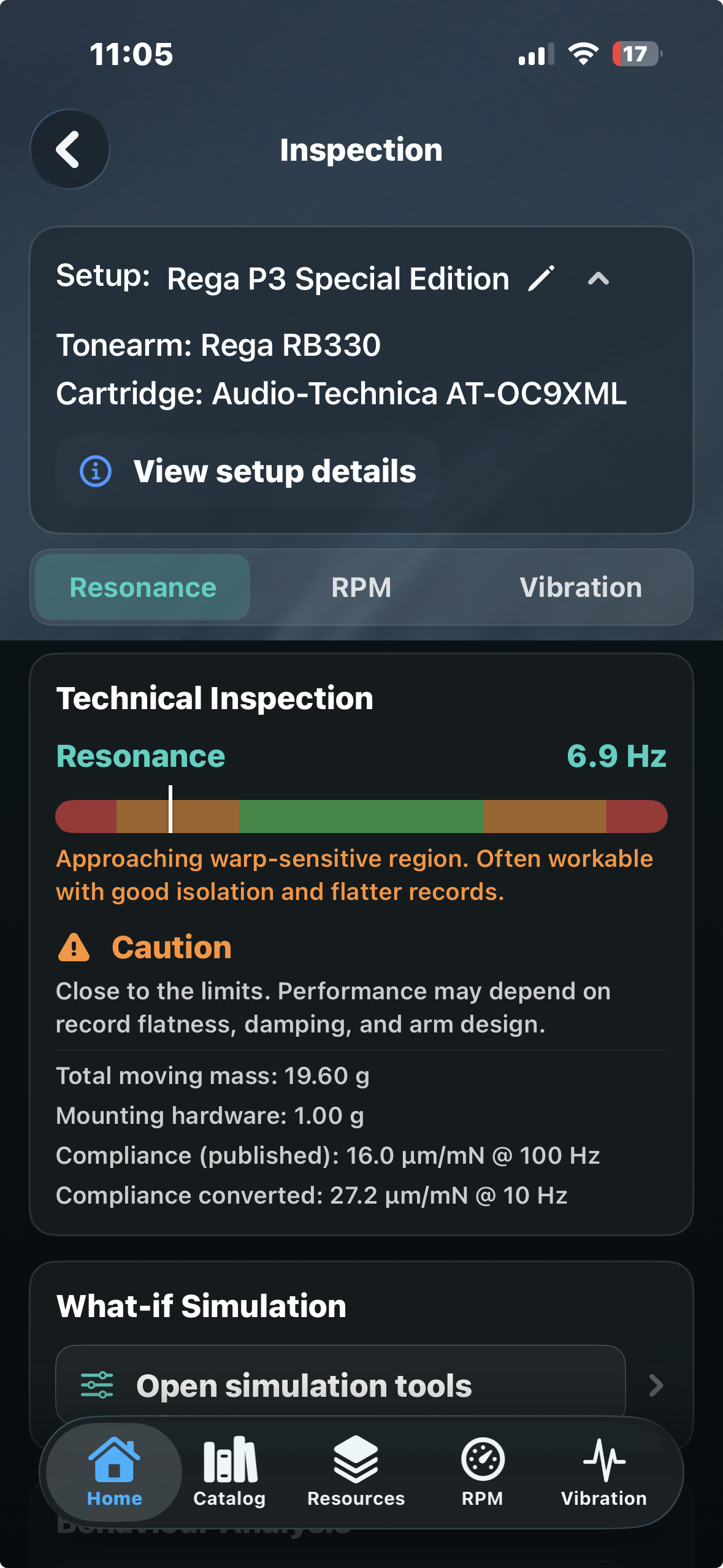
Create the real turntable, tonearm and cartridge combination and keep its relevant specifications together.


 Direct Sound Records London-Rome
Turntable setup & mechanical analysis
DSR Resonance Lab brings cartridge/tonearm resonance prediction, real-component setup analysis and a growing analogue catalogue together with new tools for mechanical RPM, wow & flutter, low-frequency vibration and stylus usage.
The established setup and resonance workflow remains free. Advanced Stylus Usage, RPM/W&F and Vibration Analysis are optional in-app upgrades.

A more complete analogue workflow
Resonance Lab starts with the actual playback system. Build the setup, predict its resonance behaviour, measure the turntable, then interpret the physical result without losing the component context.
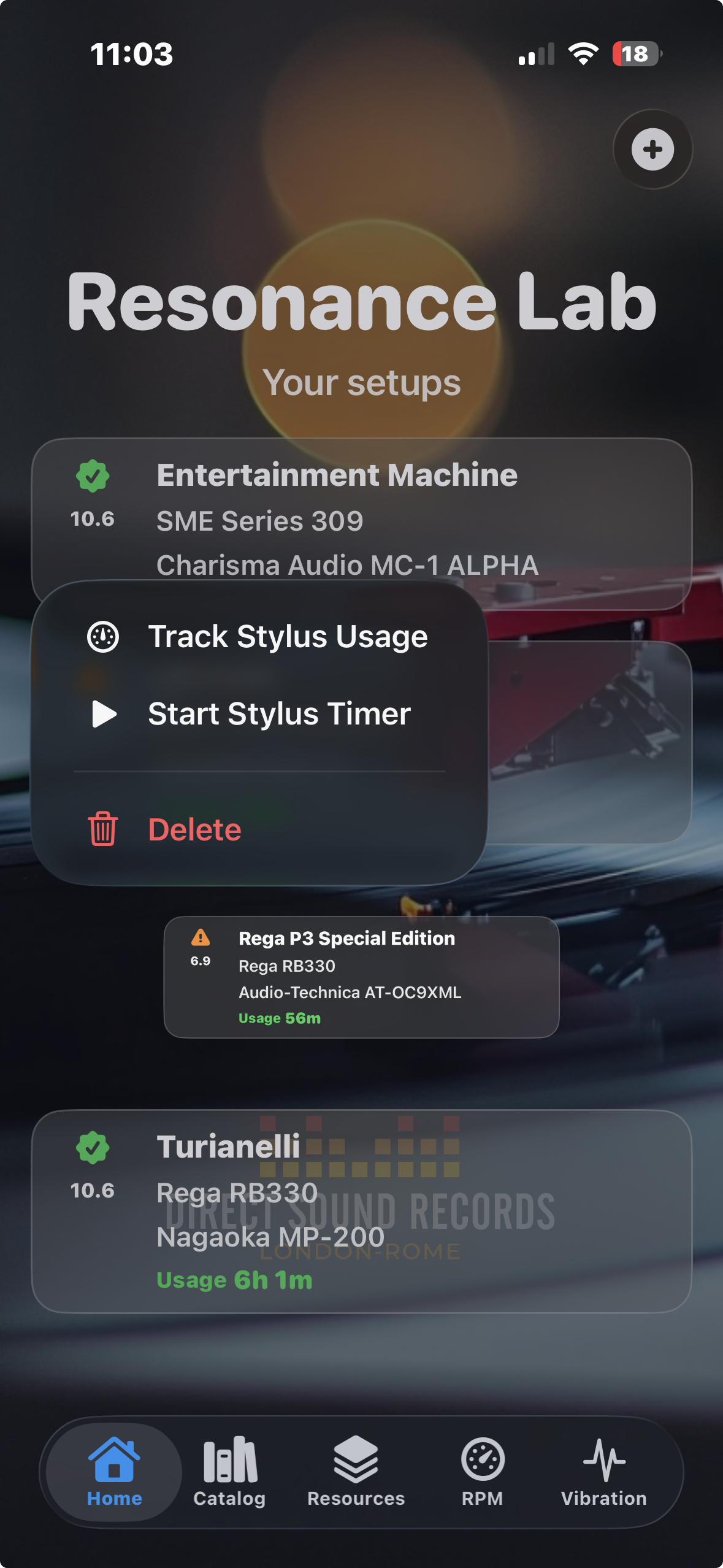
Create the real turntable, tonearm and cartridge combination and keep its relevant specifications together.
Model the arm/cartridge system from effective mass, cartridge mass, mounting hardware and compliance, then inspect the predicted resonance region.
Use the iPhone motion sensors to investigate mechanical RPM, speed variation and low-frequency vibration at the deck or support.
Compare measured behaviour with the predicted system context and keep stylus usage associated with the setup being played.
Resonance intelligence
The established Resonance Lab remains the core of the product: model the mechanical system, understand the result and explore alternatives before changing hardware.
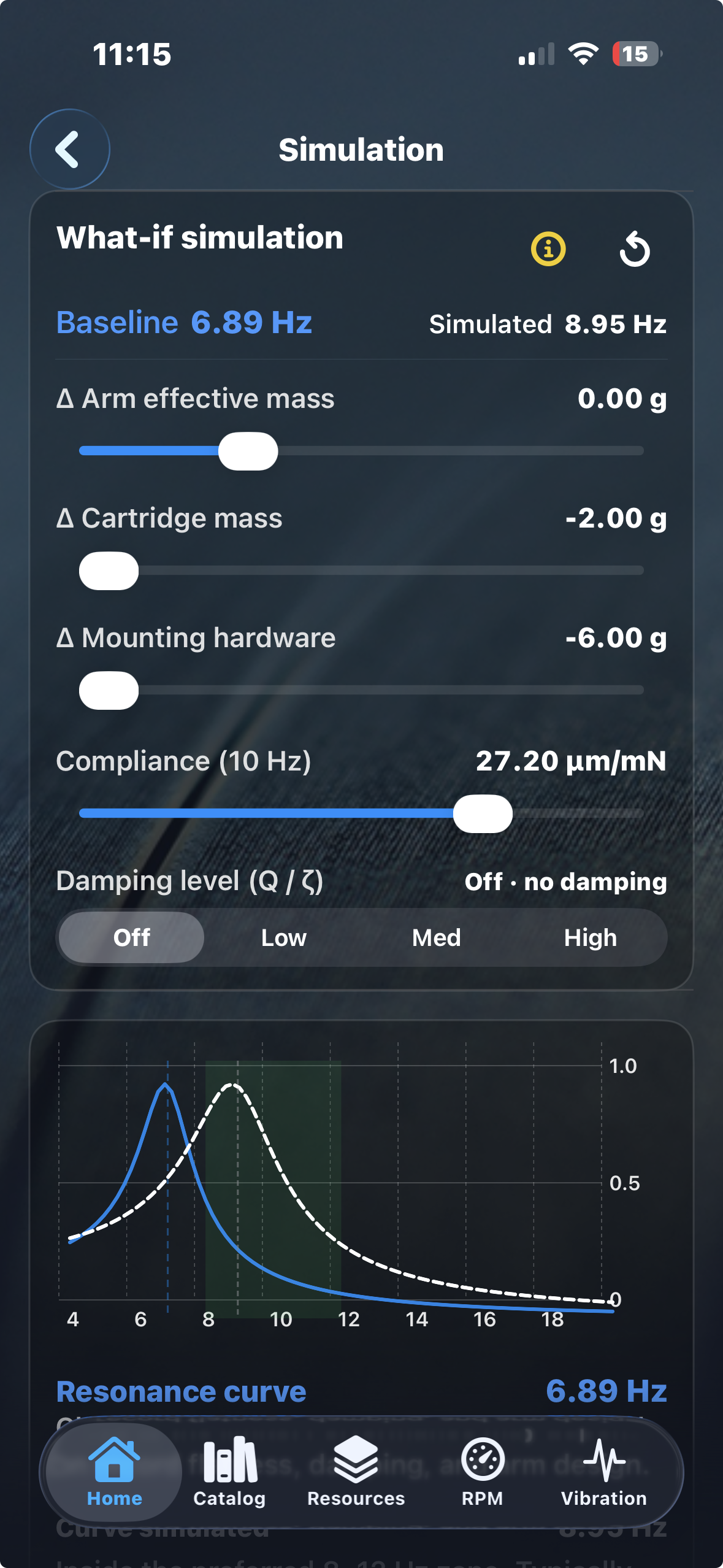
What-if simulation
Change the assumptions behind the setup and immediately see how the predicted cartridge/tonearm resonance shifts.
Behaviour + alternatives
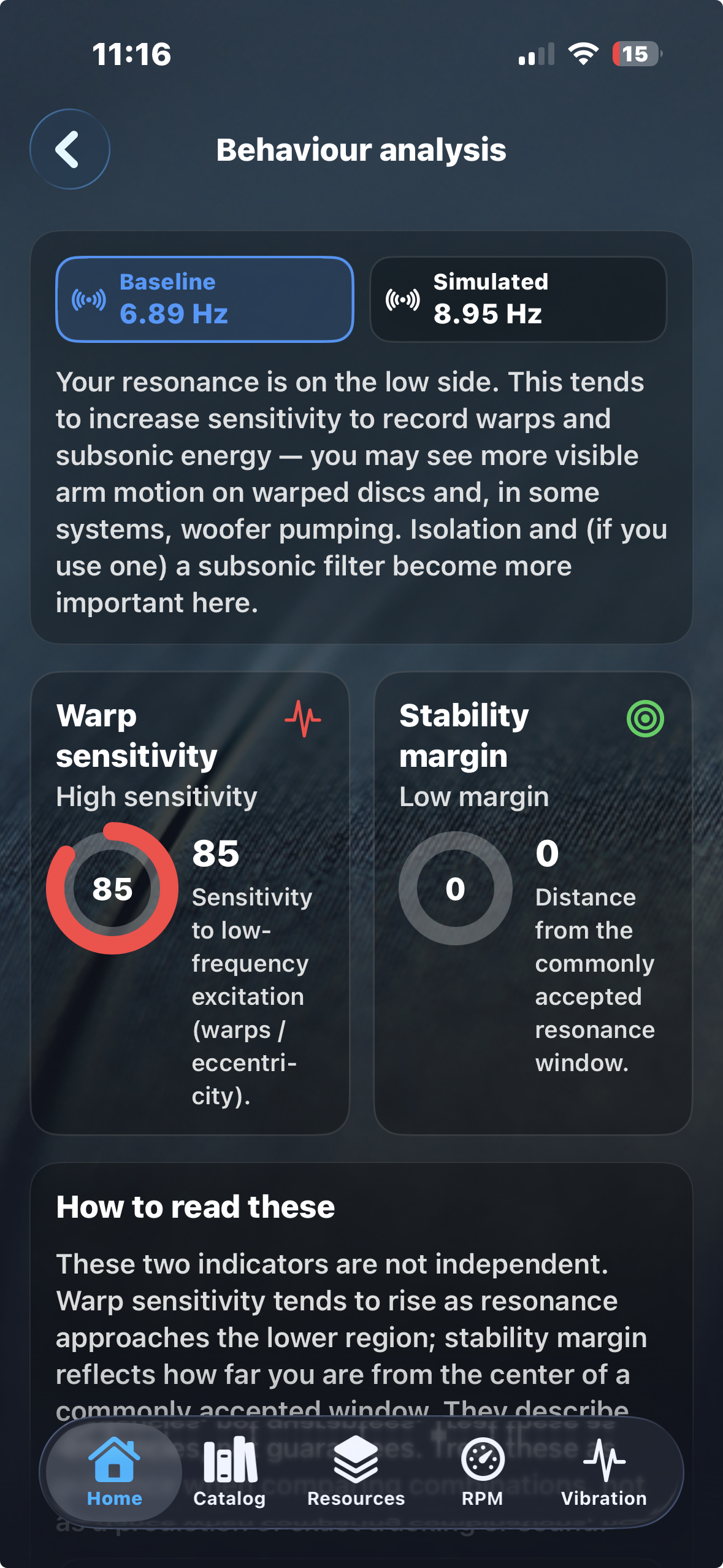
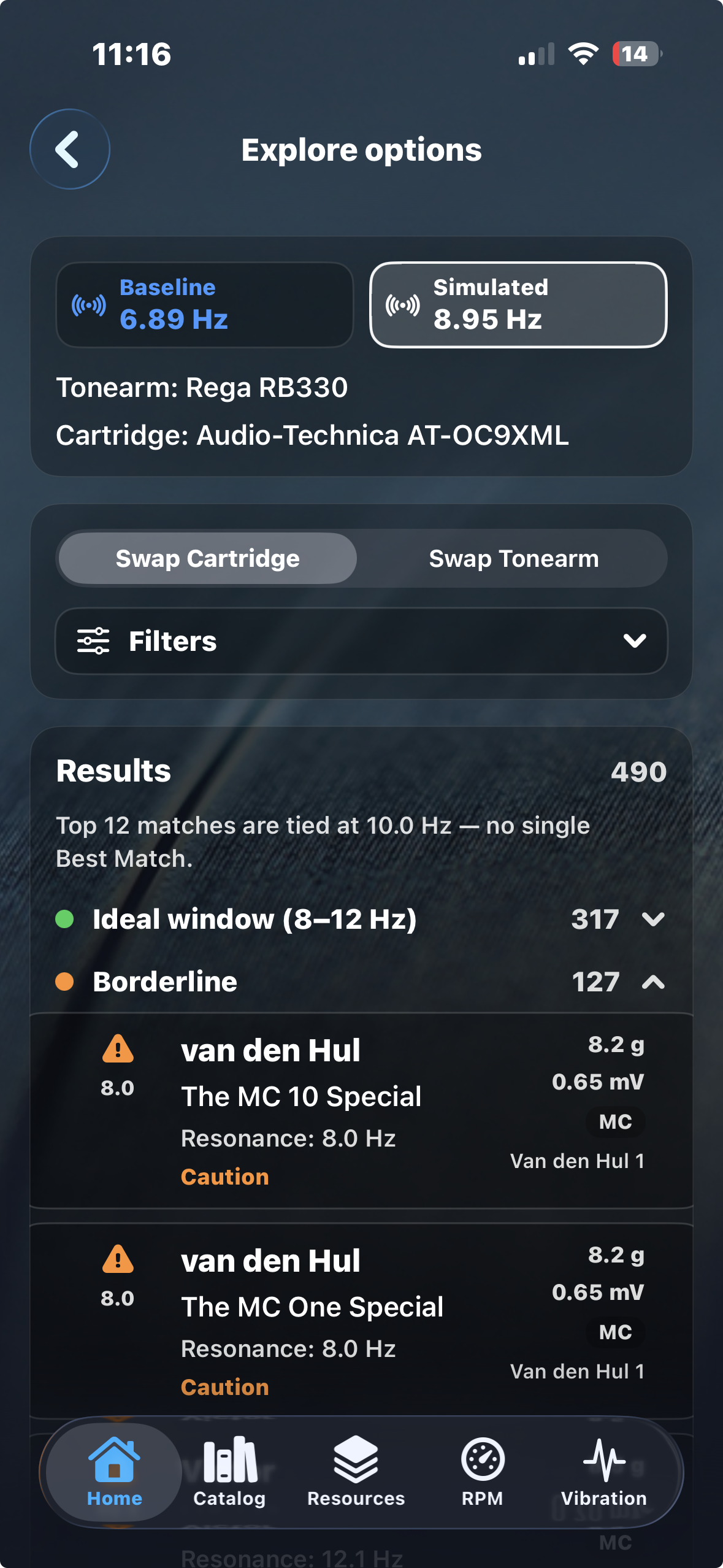
Behaviour Analysis interprets the predicted resonance in practical mechanical terms, while Explore Options keeps one component fixed and searches for alternative matches.
Mechanical RPM + W&F
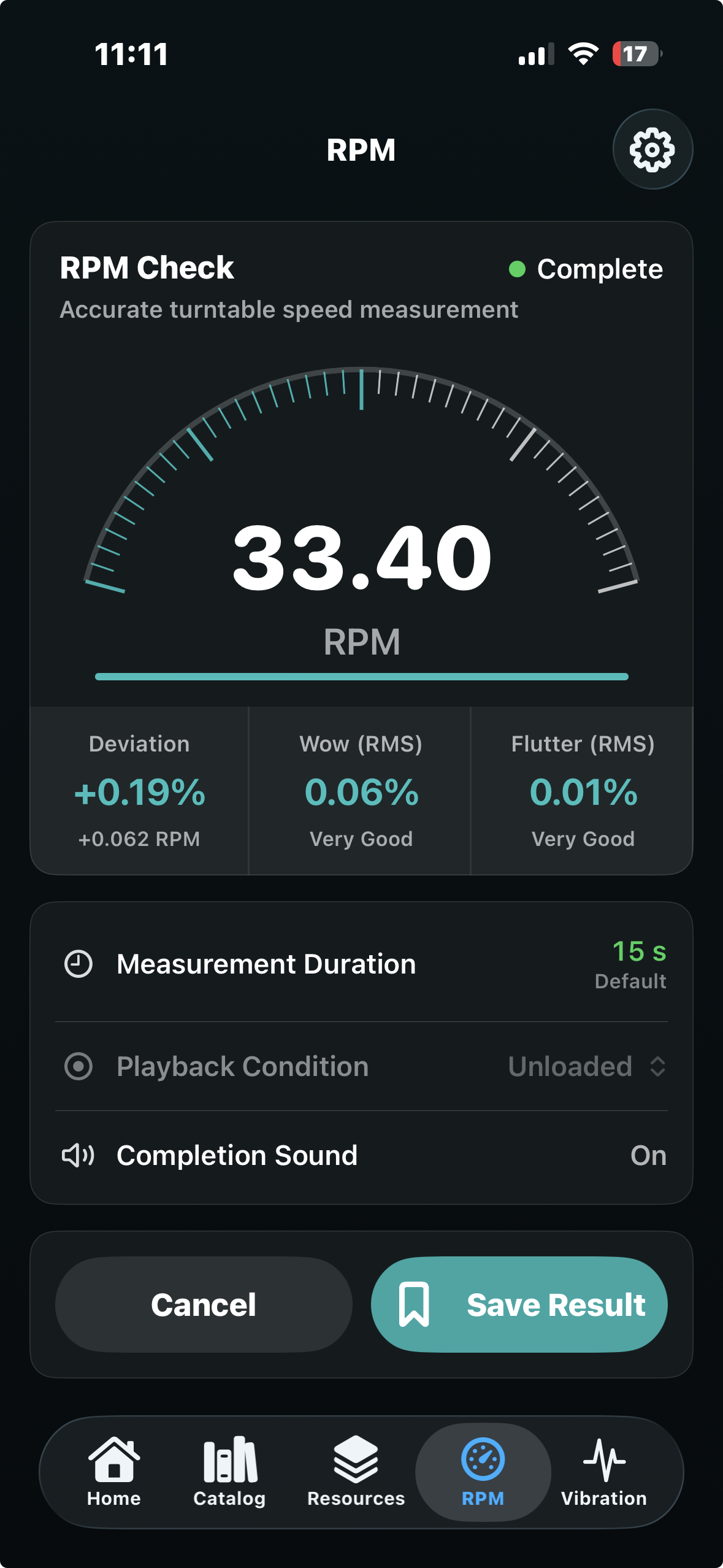
The RPM tool uses the iPhone motion sensors to inspect rotational performance, then separates average speed from short-term variation.
Low-frequency vibration
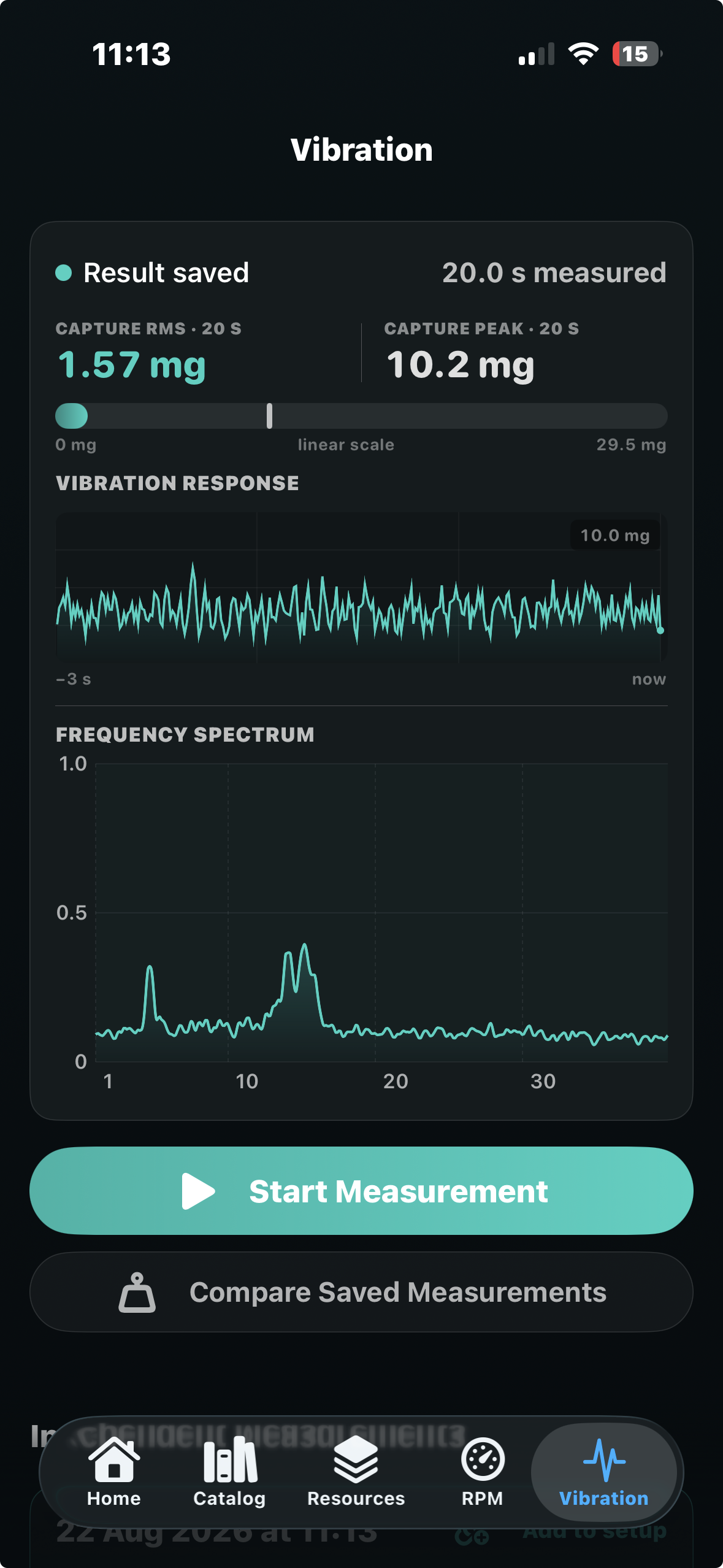
Place the iPhone on the turntable or support and inspect low-frequency mechanical motion as both a level and a spectrum.
Stylus usage
Stylus usage lives inside the saved setup rather than as a disconnected stopwatch, making it useful when several cartridges or turntables are in rotation.
Core differentiators
Resonance Lab is not a collection of unrelated utility meters. Prediction, measurement, component data and usage all relate back to the same analogue setup.
Keep the turntable, tonearm and cartridge together as the context for later analysis.
Model effective mass, cartridge mass and compliance, then interpret the predicted mechanical region.
Measure speed, deviation and mechanical wow & flutter rather than relying only on average RPM.
Inspect the amount and frequency distribution of mechanical motion reaching the turntable or support.
Keep accumulated playing time connected to the cartridge and system actually being used.
Explore real cartridge and tonearm combinations through a growing catalogue instead of anonymous values.
Prediction meets measurement
The predicted arm/cartridge resonance and the measured vibration spectrum are not the same measurement. Their value is in context: one describes where the playback system is expected to be mechanically sensitive; the other describes the low-frequency energy actually reaching the turntable.
Calculate the expected cartridge/tonearm resonance from the actual setup.
Capture low-frequency vibration at the turntable or support under controlled conditions.
Inspect whether significant measured energy occurs near the region in which the arm/cartridge system is predicted to be sensitive.
Free core + optional upgrades
The existing setup, resonance and component-exploration workflow remains free. The new maintenance and mechanical measurement capabilities extend the app through optional in-app purchases.
| Feature | Core | Upgrade |
|---|---|---|
| Saved turntable / tonearm / cartridge setups | ✓ | — |
| Resonance prediction | ✓ | — |
| What-if Simulation | ✓ | — |
| Behaviour Analysis and Explore Options | ✓ | — |
| Advanced Stylus Usage | — | ✓ |
| Mechanical RPM and W&F analysis | — | ✓ |
| Low-frequency vibration measurement and spectrum analysis | — | ✓ |
| Prediction / vibration contextual analysis | — | ✓ |
Technical reference
Direct Sound Records is extending Resonance Lab beyond the interface through technical material on cartridge compliance, tonearm effective mass, resonance modelling, RPM/W&F and low-frequency mechanical vibration.
The product page, DSR technical articles and Direct Sound Records GitHub identity create a consistent public reference around the app and the mechanics it explains. The production source repository remains private.
Resonance Lab explained
Understand tonearm and cartridge compatibility, calculate resonance frequency and make better-informed choices before changing your analogue setup.
Resonance Lab is an app for evaluating, understanding and refining turntable, tonearm and phono-cartridge setups. It calculates the expected cartridge/tonearm resonance frequency from effective mass, cartridge mass, mounting hardware and compliance, then translates the result into clear, practical guidance.
You can create and save complete turntable setups, compare alternative cartridges and tonearms, run What-if simulations, analyse predicted mechanical behaviour and explore a growing catalogue of analogue components before purchasing, mounting or changing hardware.
Resonance Lab can now go beyond prediction. Optional measurement tools use the iPhone’s motion sensors to analyse turntable RPM, speed deviation, mechanical wow & flutter and low-frequency vibration, while Advanced Stylus Usage keeps accumulated playing time associated with the cartridge and setup actually being used.
The vibration tools add an especially useful second layer to the original resonance analysis. The app can compare the predicted cartridge/tonearm resonance region with the low-frequency mechanical energy measured at the turntable or support, helping you investigate whether environmental or structural vibration is occurring close to a frequency range where the playback system may be particularly sensitive.
Resonance Lab therefore brings together component matching, mechanical prediction, physical turntable measurement and setup history in one analogue-workflow environment.
A tonearm and cartridge behave together as a mechanical system. The cartridge suspension acts like a spring, while the effective mass of the tonearm and cartridge provides the moving mass.
If their resonance frequency is poorly positioned, record warps, vibration or audible low-frequency information may interfere with tracking and playback. Resonance Lab helps identify potentially unsuitable combinations before you install them.
A resonance frequency in the region of approximately 8–12 Hz is commonly considered a useful target.
This places the resonance above many turntable and record-warp disturbances while keeping it below most recorded musical information. The result should still be treated as guidance rather than an absolute guarantee of performance.
Resonance Lab combines the tonearm’s effective mass with the cartridge weight, mounting hardware mass and cartridge compliance. These values are used to estimate the natural resonance frequency of the complete tonearm and cartridge system.
The accuracy of the estimate depends on the accuracy and comparability of the specifications supplied by the manufacturers.
You normally need the tonearm’s effective mass, the cartridge weight, the approximate mass of the mounting screws and the cartridge’s dynamic compliance.
Resonance Lab includes a component catalogue so that many of these specifications can be selected directly. You can also create a custom entry when your component is not yet included.
Compliance describes how easily the cartridge suspension moves. A higher-compliance cartridge has a softer suspension, while a lower-compliance cartridge has a stiffer suspension.
Higher-compliance cartridges are generally associated with lower-mass tonearms, while lower-compliance cartridges are often more suitable for medium- or higher-mass arms. Final compatibility depends on the complete combination rather than one specification.
Some manufacturers specify dynamic compliance at 100 Hz rather than at the lower frequency normally used for tonearm-resonance calculations. These values should not automatically be treated as equivalent.
Resonance Lab can provide an informed estimate where conversion is necessary, but the result remains approximate because cartridge suspensions do not all behave identically.
Yes. Select your tonearm and explore how different cartridge weights and compliance values affect the predicted resonance frequency.
You can also begin with a cartridge and compare compatible tonearms. This is useful when researching an upgrade, rebuilding a turntable or checking a combination suggested by a dealer or manufacturer.
Yes. Resonance Lab allows you to create and revisit different setups, save favourite component combinations and experiment without changing your existing system.
This is useful for collectors, dealers and listeners who own several cartridges, headshells, tonearms or turntables.
No. The calculation is a technically informed prediction based on published or entered specifications. Manufacturing tolerances, suspension age, damping, mounting hardware and measurement methods may affect the behaviour of the real system.
Resonance Lab provides a strong starting point for component matching, but it does not replace careful installation, listening or measurement with an appropriate test record.
Resonance Lab now extends the original cartridge/tonearm resonance and setup workflow with three optional capabilities: advanced Stylus Usage tracking, mechanical RPM and wow & flutter analysis, and low-frequency Vibration measurement and analysis.
The objective is not to replace the original resonance workflow, but to add physical turntable measurements around the same saved analogue setup.
Yes. The optional RPM tool uses the iPhone’s motion sensors to evaluate turntable rotation mechanically.
A completed measurement can report average speed, deviation from the selected target speed and additional rotational-stability information rather than reducing the result to a single RPM value.
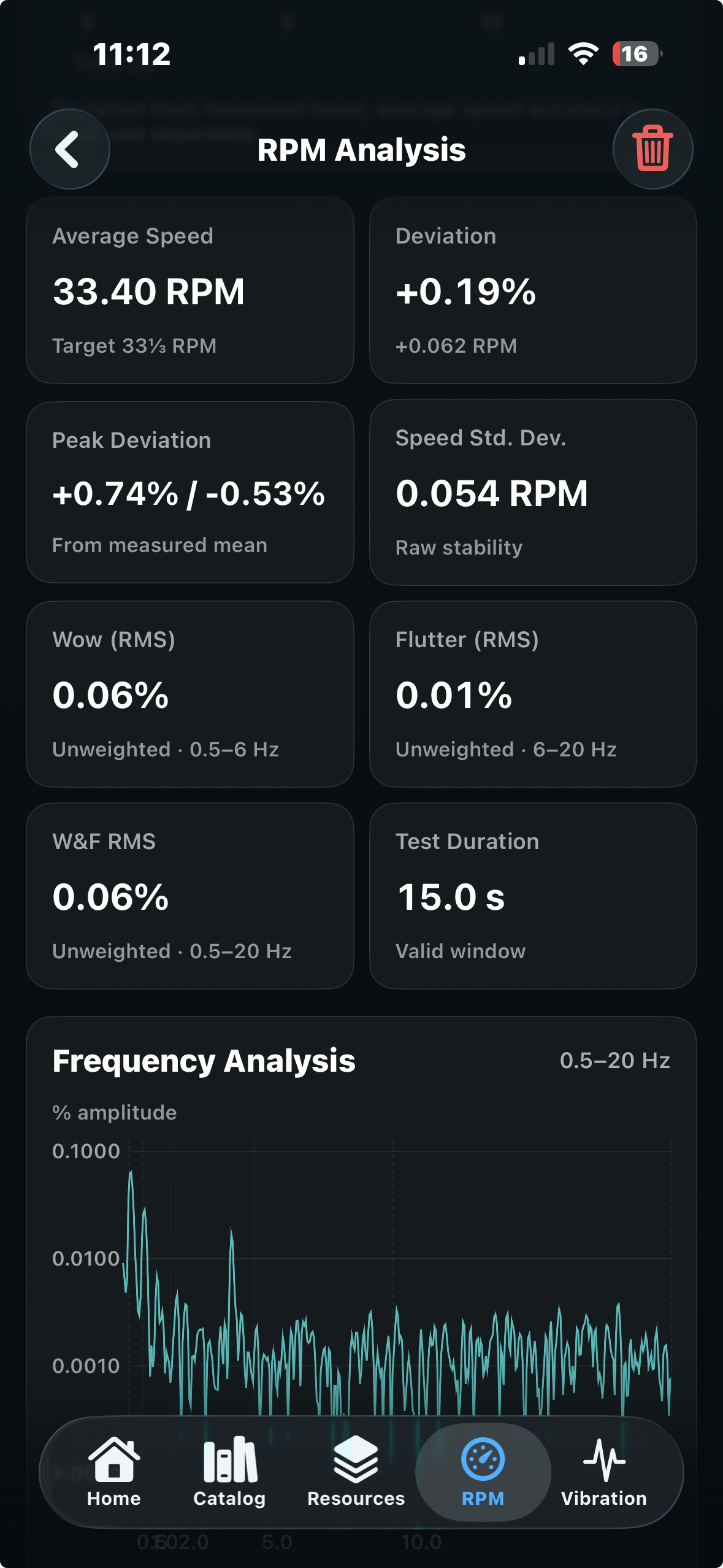
Yes. RPM Analysis evaluates short-term rotational variation and reports unweighted wow, flutter and combined wow & flutter values across the frequency regions used by the app.
Because measurement method and weighting matter when comparing wow & flutter specifications, Resonance Lab makes the analysis context visible rather than presenting the result as an unexplained laboratory-standard number.
RPM Analysis can show average speed, percentage deviation from target, peak deviation, speed standard deviation, test duration and the frequency content of rotational variation.
This helps distinguish a turntable that is simply running slightly fast or slow from one showing additional short-term speed instability.
The iPhone’s motion sensors can measure mechanical motion at the location where the phone is placed. Resonance Lab uses this capability to investigate low-frequency vibration at the turntable or its support.
The most useful applications are controlled comparison and diagnosis: for example, comparing supports, isolation arrangements, locations or operating conditions while keeping the measurement method consistent.
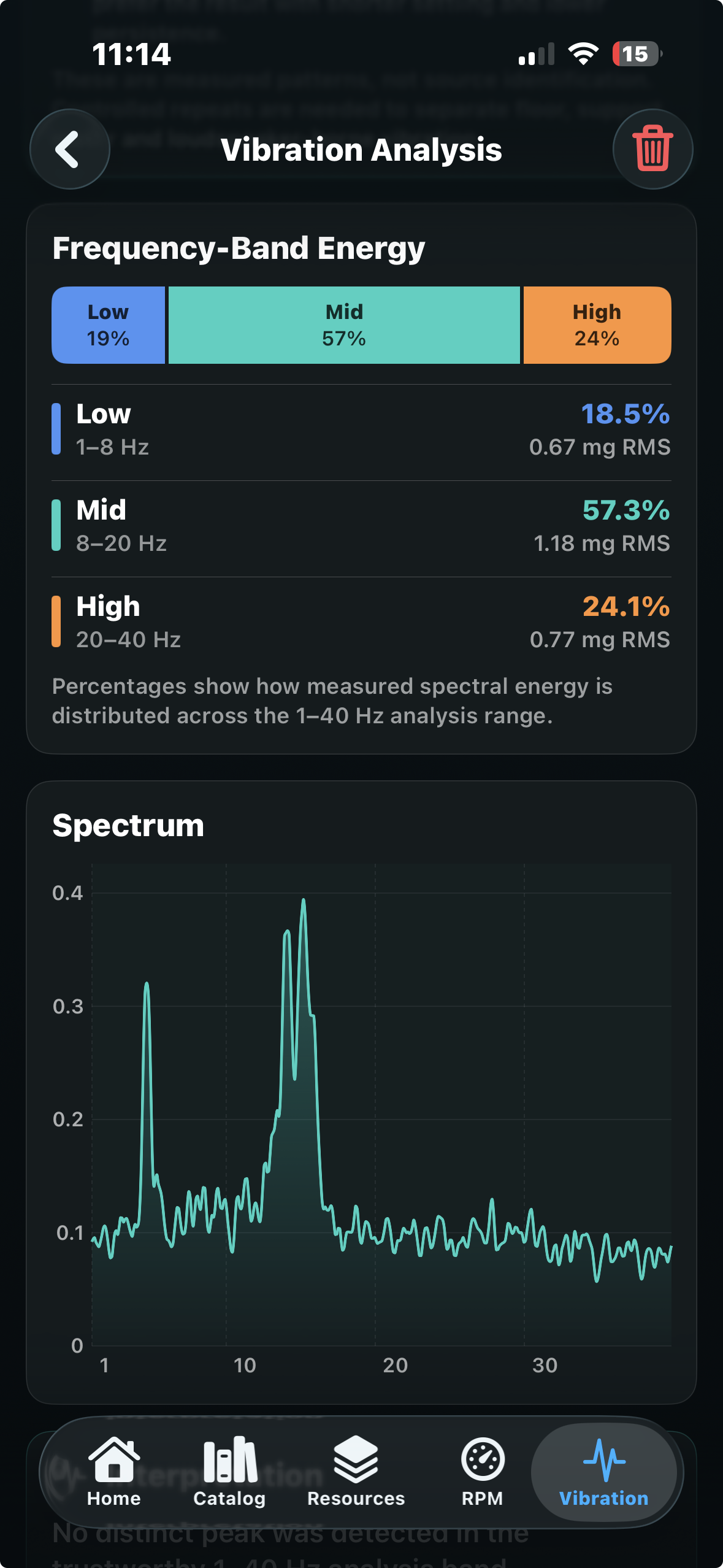
The current Vibration Analysis covers the 1–40 Hz region and retains a detailed frequency spectrum.
It also groups measured energy into 1–8 Hz, 8–20 Hz and 20–40 Hz bands, making it easier to see where low-frequency mechanical activity is concentrated.
No. A phone placed on the turntable or support measures mechanical vibration at that location. It does not directly measure the stylus/cantilever and tonearm resonance.
The cartridge/tonearm resonance remains a prediction based on the setup specifications unless it is measured separately with an appropriate test record and signal-analysis method.
The two results describe different parts of the mechanical problem. The resonance calculation estimates the frequency region in which the cartridge/tonearm system is likely to be most mechanically sensitive, while the vibration measurement shows where low-frequency mechanical energy is actually present at the turntable or support.
Viewing those results together can help identify situations in which environmental or structural vibration occurs close to the predicted resonance region and deserves further investigation.
Yes, as a comparative measurement tool. Repeating a vibration measurement with the iPhone in the same position and under similar conditions can help show how a different shelf, platform, feet, isolation solution or turntable location changes the measured low-frequency vibration.
For meaningful comparison, phone placement and test conditions should be kept as consistent as possible.
Stylus Usage keeps playing time associated with the saved setup and cartridge that actually generated it instead of functioning as a generic standalone timer.
This is particularly useful when several cartridges, headshells or complete turntable systems are used in rotation and their accumulated playing time needs to remain separate.
The established Resonance Lab setup, resonance calculation, What-if Simulation, Behaviour Analysis, Explore Options and component-exploration workflow remains free.
Advanced Stylus Usage, mechanical RPM and wow & flutter analysis, and low-frequency Vibration measurement and analysis are optional in-app purchases. Exact packaging and pricing are shown in the app and may vary by App Store region.
No. Resonance Lab is designed to make the iPhone’s motion sensors useful for practical turntable investigation, repeatable comparison and setup analysis.
Results depend on the device sensors, phone placement, test duration and measurement conditions. Where certified, standards-based or laboratory-grade measurements are required, appropriate specialist instrumentation and defined test procedures remain the reference.
DSR Resonance Lab for iPhone & iPad
Build the analogue system, model its resonance behaviour, investigate RPM and vibration, and keep stylus use attached to the setup that matters.
Resonance calculations depend on the accuracy and comparability of component specifications. Mechanical measurements depend on device sensors, phone placement and test conditions. Resonance Lab is designed for practical analysis and comparison and does not claim to replace calibrated laboratory instrumentation.